Connect LinkedIn once.
It posts from then on.
Sign in with LinkedIn, or connect a client’s company page, once. After that, approved posts go out on a schedule and the numbers come back.
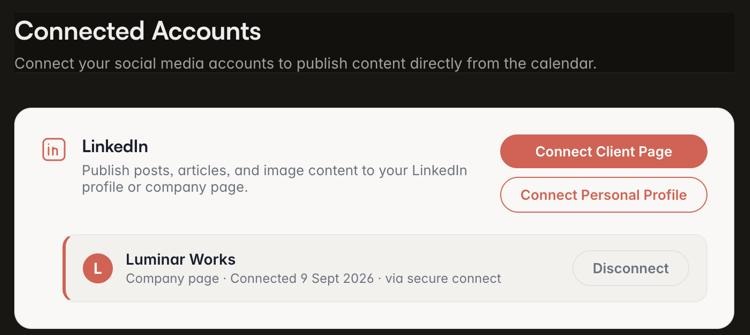
Two connections that post for you. Two that you paste.
LinkedIn profiles
Sign in with LinkedIn once. Approved posts go out now or on a schedule.
- Likes, comments and shares come back
- If it fails, the card says failed, and why
LinkedIn company pages
Connect a client’s page once, one per workspace. Posts and carousels go out on schedule.
- Carousels as document posts
- Impressions and reach come back too
Instagram, Facebook, X
The post is formatted for each. One click copies the caption; you paste.
- A preview tab per platform
- No date promised
YouTube
A thumbnail post: the thumbnail at 1280 × 720, with the title, description and tags written for it. One click copies the words; one downloads the thumbnail.
- Under YouTube’s 2 MB limit
- We don’t upload to YouTube
Schedule it. Close the laptop.
Now, or on a schedule
Publish now, or pick a date and time and a worker posts it for you, checking every minute. Three attempts; then the card says failed, and why.
Carousels as documents
A carousel template publishes as a LinkedIn document post, the format it gives the most room to.
What comes back
Personal-profile posts carry likes, comments and shares. Company pages add impressions and reach. Clicks are not on either list. Numbers refresh on a schedule, and each refresh keeps a dated snapshot.

What we do not do, yet.
From approved to posted.
- 01
Connect
Sign in with LinkedIn, or connect a client’s page. Once, one per workspace.
- 02
Approve
It reaches the schedule when its status is approved.
- 03
It posts
At the scheduled time. Failures show their reason on the card.
- 04
It reports back
A dated snapshot each refresh.
What people ask.
Do company pages really publish?
Yes, today. Connect the page once and posts and carousels go out on schedule. Behind it sits a publishing partner rather than our own LinkedIn app — nothing changes about what you do.
How often do the numbers update?
Not live: nightly for a fresh post, weekly as it ages, once more after a month. Each refresh keeps a dated snapshot on the card.
What happens when a scheduled post fails?
Three attempts, then the card says failed and shows the reason, so you can fix and reschedule.
When is Instagram coming?
There is no date. Instagram, Facebook and X are copy and paste.
Does it post to YouTube?
No. It makes the thumbnail and writes the title, description and tags; you upload them with your video.
Can one client see another’s connections?
No. Connections belong to a workspace, and a workspace is one client.